





You want the best vfd drive for your application. Start by checking your motor specifications. Look at your load and environment. Size the drive to match your needs. Review how you plan to control the variable frequency drive. Matching the vfd to your motor and application makes your system work better. Use a checklist to feel confident in your choice. Canroon can help you every step of the way.
Key Takeaways
First, look at your motor’s details. Check horsepower and full load amperage. This helps you pick a VFD that matches your motor.
Think about the kind of load you have. Loads like pumps or conveyors need special VFD types. This helps them work their best.
Look at the area before you install. Dust, humidity, and heat can change how well a VFD works. These things can also make it last less time.
Make a checklist to help you choose a VFD. This helps you remember what is important. It also helps you not make mistakes.
Talk to suppliers for advice on the right VFD type. They know a lot and can help you choose well.
Understanding Your Application Needs
Load Type And Motor Specs
You need to start your vfd selection criteria by looking at your application. First, check the type of load you have. Loads can be constant, variable, or cyclical. For example, pumps and fans often have variable loads. Conveyors and compressors usually have constant loads. You must know your motor horsepower and full load amperage. These numbers help you pick the right vfd for your motor. If you choose a vfd that is too small, your motor may overheat. If you choose one that is too large, you waste energy and money.
Tip: Write down your motor nameplate details before you begin. This makes the process easier.
You should also think about energy efficiency. A good match between your motor and vfd can save power and lower costs. Use a table to organize your motor specs:
Speed, Torque, And Duty Cycle
You must consider speed and torque requirements for your application. Some machines need high speed at startup. Others need steady speed all day. Write down the speed range you need. For example, you may need your motor to run from 500 to 1800 RPM. This helps you choose a variable frequency drive that can handle your needs.
Torque requirements matter too. Heavy loads need more torque. If your application needs high torque at low speed, you must select a vfd that can deliver it. Duty cycle tells you how often your motor runs. Motors that run all day need a different vfd than motors that start and stop often.
List your speed range.
Note your torque requirements.
Write down your duty cycle.
You make better choices when you know your application and motor details. This helps you select a vfd that works well and lasts longer.
Selecting The Right VFD Drive
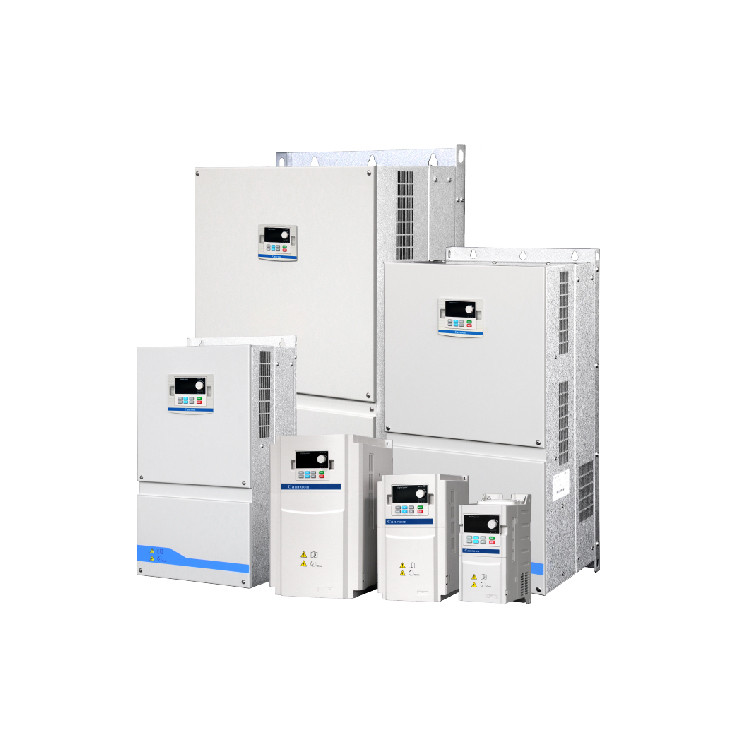
VFD Sizing And Compatibility
You need to match your vfd to your motor and application. Start by checking the motor voltage and full load amperage. The vfd drive must handle the highest current your motor will draw. If you choose a drive that is too small, your motor may not start or run well. If you pick a drive that is too large, you waste money and lower efficiency.
You should look at the speed range your motor needs. Some motors run at one speed all day. Others change speed often. The variable frequency drive must support the full speed range. Write down the lowest and highest speed you need. This helps you find a vfd drive that fits your motor.
Note: Always check the compatibility between your motor and the vfd. Some motors need special drives for best performance.
You also need to think about energy efficiency. A good match between your motor and vfd saves power and lowers costs. Many industrial applications use vfd drives to improve efficiency and control.
Here is a simple checklist for sizing:
Write down your motor voltage.
List the full load amperage.
Note the speed range.
Check the drive’s current rating.
Make sure the drive matches your motor type.
VFD Types And Control Methods
You will find different types of vfd drives for industrial applications. Each type works best for certain jobs. You need to know which type fits your needs.
VSI (Voltage Source Inverter): You see this type in many industrial applications. It gives fast response and good voltage control. You can use it for pumps, fans, and conveyors.
CSI (Current Source Inverter): This type works well for jobs that need smooth waveforms or high current. You may use it for large motors or special machines.
DTC (Direct Torque Control): This type focuses on controlling torque directly. It helps when you need precise torque and speed control.
You should choose a variable frequency drive based on your motor and the job you need to do. If you need fast changes in speed, VSI is a good choice. If your motor needs high current, CSI may work better. For jobs that need exact torque, DTC is the right pick.
Tip: Ask your supplier about the best vfd type for your motor and application. This helps you get the most out of your drive.
You can use a table to compare the main types:
You make better choices when you know your motor, your application, and the types of vfd drives. This helps you get the right drive for your needs and improve efficiency.
Environmental And Installation Factors

Indoor Conditions And Enclosure Ratings
Check the space where you want to put your vfd. Indoor air and room conditions can change how your drive works. Dust, water, and heat can hurt your motor and make it less efficient. Look at the enclosure rating for your vfd. This rating shows how well the drive is protected from dust and water.
Leave enough space around your vfd for cooling and repairs. Air needs to move around the drive to keep it cool. If the drive is in a small space, heat can build up. This makes your motor less efficient.
Tip: Always check the installation guide for your vfd. This helps you stop problems and save energy.
Air Quality, Humidity, And Temperature
Check the air before you install your vfd. Dirty air can block vents and use more energy. High humidity can cause rust and short circuits. Keep the area dry and clean. If your motor is in a hot room, the vfd can get too warm. Most drives work best between 0°C and 40°C. Use fans or air conditioning to keep the temperature right and protect your motor.
Watch for changes in humidity and temperature. Big changes can hurt your vfd and make it less efficient. If you use the drive in tough places, pick one with extra protection. This helps you save energy and use less power over time.
Note: Clean air, steady temperature, and low humidity help your vfd work better and last longer.
Control, Integration, And Special Considerations
Communication And Automation Needs
You want your vfd to work with your control system. Many drives use common communication protocols. These help you connect your vfd to automation networks. You can use Modbus, CANopen, or Profibus for linking. This lets you connect controllers and sensors. It makes monitoring and adjusting easier.
Setting up your vfd is quick with easy features. Some drives work well in Studio 5000®. You get simple integration and better operation. Many vfd models offer predictive maintenance. This lets you track performance and find problems early. You improve efficiency and reduce downtime.
You also get advanced safety and control features. Some vfd drives use SIL2-certified safety architecture. Others have vibration suppression algorithms. You can use Modbus RTU with CIP Motion support for better control.
SIL2-certified safety architecture
Vibration suppression algorithms built in
Control Interface: Modbus RTU with CIP Motion support
Harmonics, Cable Length, And Multiple Motors
You need to think about special things when installing your vfd. Harmonics can affect your motor and other equipment. High harmonics may cause overheating or noise. You can use filters to lower harmonics and protect your system.
Cable length matters too. Long cables can lower signal quality and cause voltage drops. Check the cable length between your vfd and motor. Use shielded cables for better performance in factories.
Sometimes you want to run more than one motor with one vfd. You must check the total load and make sure the drive can handle it. You need to balance the load for safe operation. This helps your system run smoothly and keeps your equipment safe.
Tip: Always check your installation plan. Good planning helps your vfd work better and last longer.
Checklist For Selecting A Variable Frequency Drive
Step-By-Step Selection Guide
You want to pick the right variable frequency drive. Use this checklist to help you decide. Each step helps you match the vfd to your motor and job.
Determine the Type of Load and Application
First, find out if your load stays the same or changes. Pumps, fans, and conveyors need different vfd drive choices.Match the VFD to Motor Specifications
Check your motor’s voltage, current, and power rating. Make sure the drive matches these numbers.Consider the Control Method
Decide how you want to control your vfd. Some jobs need simple speed control. Others need advanced torque control.Take into Account Environmental Conditions
Look at where you will put the vfd drive. Dust, heat, and humidity can change how it works.Evaluate the Size and Installation Flexibility
Measure your space. Make sure the variable frequency drive fits. Modular designs help in small spaces.Ensure Safety and Protection Features
Pick a vfd with safety features built in. You may need extra protection for tough places.Monitor and Control
Use drives with monitoring features. You get feedback and can spot problems early.
Tip: Write down each step as you go. This helps you remember important details.
Common Mistakes To Avoid
You can make mistakes when picking a variable frequency drive. Watch out for these common errors:
Not checking motor specs. If you skip voltage or current, your vfd may not work.
Forgetting about dust or heat. These can hurt your drive.
Picking the wrong control method. Your job may need more than basic speed control.
Not measuring your space. Drives need room for cooling and fixing.
Missing safety features. You risk damage or downtime without protection.
Canroon helps you at every step. You get advice and help with picking a variable frequency drive. Ask questions and share your motor details. You make better choices and keep your system working well.
You can pick the right vfd for your job by making sure it fits your motor, load, and where you use it. The checklist helps you make good choices. If you follow every step, your system works better and stays safe.
Look at your motor information
See if you have enough space for installation
Choose the control features that work best
Need help? You can ask Canroon for advice or check out more vfd options today.
FAQ
What is a VFD drive?
A VFD drive controls the speed and torque of an electric motor. You use it to save energy and improve process control. You can adjust motor speed for different tasks.
How do you size a VFD for your motor?
Check your motor’s voltage, horsepower, and full load amperage. Pick a VFD that matches or slightly exceeds these values. Always use your motor nameplate for accurate sizing.
Can you use one VFD for multiple motors?
You can run several motors with one VFD. Make sure you add up the total current and check the load balance. You must confirm the VFD can handle the combined load.
Previous:
Next:
Sign up for updates